

Key takeaways
- Compare the bare switch with the fully assembled button before changing the switch model.
- A heavy press, weak feedback, slow return and missed activation can have different mechanical or electrical causes.
- Choose operating force and travel by exact part number, then test samples in the intended button assembly.
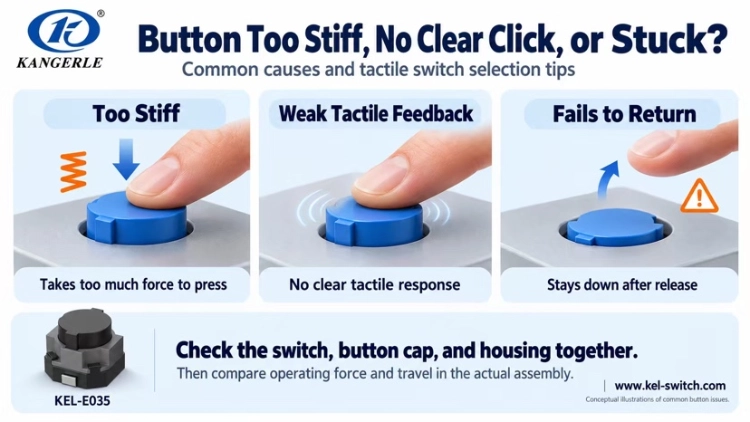
A tactile switch may feel normal on its own but become stiff, lose its feedback or fail to return once installed. Such problems can occur in appliance panels, remote controls and automotive buttons. The cause may be the switch configuration—or friction, alignment and fit in the surrounding mechanism.
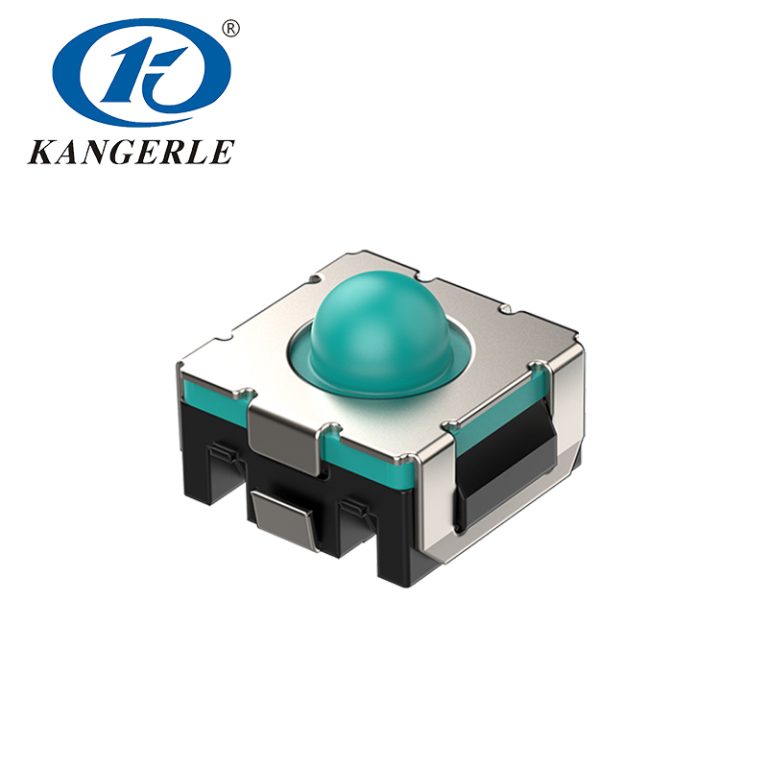
Start by comparing the switch alone with the complete button. The checks below explain when to revise the mechanism, when to compare another switch configuration and how to evaluate KANGERLE automotive tactile-switch samples.
Is the Problem in the Switch or the Button Assembly?
Here, “switch” means the component mounted on the PCB; “button” means the complete assembly, including the cap, guides, housing and switch. Datasheet operating force describes the switch, not all resistance a finger feels through the assembled button.
| Observed symptom | Check first |
| Normal alone; heavy or sticky after assembly | Cap-to-panel friction, alignment, clearance and support |
| Heavy or unsatisfactory even when tested alone | Exact force option, tactile response and sample condition |
| Works at the center but not at the edge | Cap guidance, tilt, press location and support flex |
| Cap returns, but the device does not respond correctly | Electrical switch state, solder joints and control circuit |
These checks narrow the cause; one manual press cannot establish component compliance. Disconnect power before opening equipment, use qualified personnel and keep the PCB properly supported during testing.
Button Too Stiff? Check Friction Before Operating Force
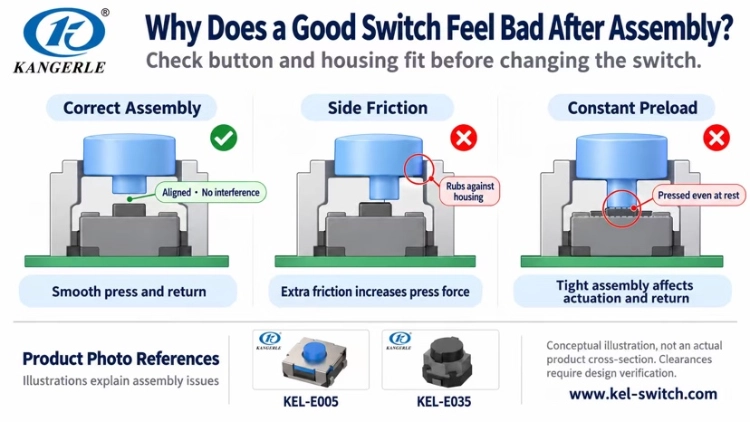
Possible causes include an unnecessarily high-force option, a cap rubbing against the bezel, misalignment between cap and actuator, or an overly tight assembly that presses the switch even at rest.
First operate the switch directly in the specified direction. Then compare the completed button. If the assembled unit is noticeably heavier, inspect cap movement, centering and whether tightening the enclosure changes the clearance. Force felt on the cap alone does not prove the switch is out of specification.
If the mechanism is free of interference but the bare switch is still too heavy, compare lower-force variants with the same series, travel and mounting conditions. Recheck return, accidental activation and comfort during repeated use.
Little or No Feedback? Identify What Is Missing
“No feel” can mean too little movement, an indistinct change in resistance at actuation, or simply a quiet click. Define whether the problem is movement feedback, tactile feedback or sound—these are not interchangeable.
If the bare switch provides a solid response but does not when assembled onto your board, check for deformation of cap or rubber, sinking supports and off-center loading. If the switch does not have such a response itself, compare other tactile characteristics and travel. In situations where the switch itself does not provide a sufficient or satisfying tactile response, compare options with alternate resistance and travel.
Longer travel may create a more noticeable movement, but does not guarantee a clearer tactile response. Likewise, higher operating force does not automatically mean better feedback.
Button Will Not Return? Look for Binding and Preload
This can result in a cap binding against the panel, getting stuck by tight tolerances or sitting at rest and continuously pressing switch. This final rule is called preload. If the switch still fails to return after being removed from the button assembly, check for possible component damage or abnormalities and compare it with a known-good sample of the same model.
Determine whether the cap or the switch fails to return. Remove continuous pressure, support the PCB, operate the switch in its specified direction and compare it with a good sample of the same model. Check for tilt, debris or obstruction.
Correct the cap fit and guidance when the assembly binds; verify switch height and installation distance when preload exists. Retain suspect switches for supplier review. Do not conceal a return problem by choosing a higher-force model, adding oil or cleaner, or repeatedly pressing harder.
Missed Activation or Accidental Presses? Check the Trigger Conditions
If the cap reaches the housing stop before the switch actuates, check the available travel and installed distance. If the center works but the edge does not, examine cap guidance and tilt. A tactile click without an electrical signal calls for checks of contact response, soldering and circuitry; sound alone does not prove continuity.
For accidental presses, examine cap protrusion, exposure to pressure and whether a recess or guard is needed. Force and travel can help but cannot prevent every unwanted press; software debounce cannot stop physical actuation.
Provide a mechanical stop that protects the switch from excessive movement and load. Do not compensate for incorrect installation distance simply by pressing harder.
Understand Operating Force and Travel Before Selecting
Operating force: how hard the switch is to actuate
Operating force is the actuation load measured under the maker’s stated conditions, commonly expressed in gram-force (gf). Under equivalent conditions, a higher rated value generally requires more force. It is not the total resistance of the assembled button. For frequently used controls, consider repeated-use comfort as well as force.
Travel: how far the switch moves
Travel describes movement during pressing, but datasheets may specify pre-travel or another defined stroke interval. Confirm the start and end points of the measurement. Switch travel is not necessarily equal to the cap’s full movement. A lighter press and a shorter press are different requirements: a short-travel switch can be stiff, while a long-travel switch can offer several force options.
Use Automotive Applications to Shortlist Travel
The following ranges and examples come from KANGERLE automotive tactile-switch materials. They are starting points, not fixed rules for all vehicle keys, reading lights, windows or steering-wheel buttons.
| Travel group | Listed range | Example application | Selection focus |
| Corto | 0.1–0.3 mm | Car remote key | Check cap fit and activation feedback |
| Mezzo | 0.3–1.0 mm | Reading light, power window | Compare movement, effort and return |
| Long | 1.0–1.3 mm | Center console, steering wheel | Confirm space, stroke and mechanical stop |
The ranges overlap; refer to each part number’s exact travel. Button position, protrusion and operating force also influence accidental activation. Review current KANGERLE tact-switch options when choosing candidates.
Compare Actual KANGERLE Configurations
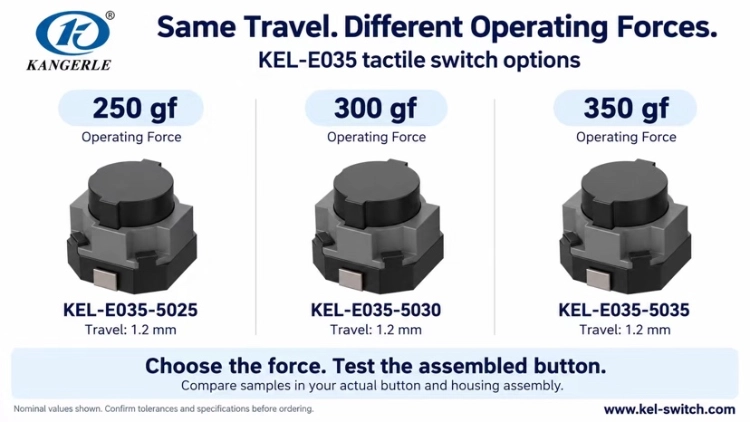
Case 1: Keep travel constant and adjust operating force
If the press distance is suitable but the button feels too light or heavy, compare force variants with the same travel. These KEL-E035 configurations each list 1.2 mm travel:
| Part number | personale operativo | Viaggio |
| KEL-E035-5025 | 250 gf | 1.2 mm |
| KEL-E035-5030 | 300 gf | 1.2 mm |
| KEL-E035-5035 | 350 gf | 1.2 mm |
Fit them into the same assembly and compare effort during repeated pressing, feedback and reset. The E035 is also described as a low-noise switch with tactile feedback; evaluate sound separately from feel when noise matters.
Case 2: Confirm the full model code within a series
KEL-E005 variants differ in height, force and travel. Neither “E005” nor “350 gf” is enough to identify the correct part.
| Part number | Height | personale operativo | Viaggio |
| KEL-E005-34D18B | 3.4 mm | 180 gf | 0.3 mm |
| KEL-E005-34D25W | 3.4 mm | 250 gf | 0.35 mm |
| KEL-E005-34D40W | 3.4 mm | 400 gf | 0.35 mm |
| KEL-E005-52D35B | 5.2 mm | 350 gf | 0.5 mm |
| KEL-E005-52D20W | 5.2 mm | 200 gf | 0.5 mm |
The 250 gf and 400 gf options listed above share 3.4 mm height and 0.35 mm travel, making them useful for a controlled force comparison. Changing to a 5.2 mm version requires another installation-distance check. These examples come from KANGERLE automotive materials; confirm tolerances and definitions against the approved drawing.
Case 3: Short travel does not always mean light force
Some KANGERLE remote-key switch options list the same 0.2 mm travel with operating forces of 160, 250 and 400 gf. For a car key, check travel, force and mounting dimensions independently, then test the switch in the actual key housing.
Four Steps to Compare Samples
Step 1 — Test the bare switches. Press in the specified direction and compare force, tactile response and return. Record full part numbers. Manual pressing helps screening but is not a substitute for measured force.
Step 2 — Build the same assembly. Use the intended PCB, cap and housing. Look for newly introduced stiffness, binding or preload.
Step 3 — Press the center and edges. Use realistic finger positions and check consistent actuation and return—not just the easiest central press.
Step 4 — Repeat the actual task. Check fatigue, missed presses and slow return. The NIOSH ergonomics overview offers general background, not a target force for this switch. For formal acceptance, use agreed specifications and test conditions. Consult the IEC standards catalogue for applicable standards; feel testing does not replace durability or reliability verification.
Information to Send KANGERLE for Selection Support
Describe the issue first: “the button is too stiff,” “we want more obvious movement,” or “return is slow after assembly.” A reference part number, photo or press video can help distinguish a selection issue from a structural one.
| Information needed | Esempi |
| Posizione di candidatura | Steering wheel, center console, reading light, window or key |
| Mounting requirements | Footprint, height, terminals or pads, press direction |
| Desired feel | Lighter or firmer press, longer movement or quieter operation |
| Current symptom | Heavy after installation, edge-press failure or slow return |
| Other conditions | Electrical load, environment, protection, life, current model |
Also note whether the issue started immediately after assembly or later in service, and whether every button or only certain positions are affected. Images showing the cap, switch and PCB assembled are especially useful.
KANGERLE company information e il pagina dei contatti provide ways to discuss model-specific questions. KANGERLE can help shortlist configurations based on application, mounting space and intended button feel; final selection should be checked in a representative assembly.
FAQ
Does higher operating force always give better tactile feel?
No. Tactile feel also depends on the force change at actuation, return behavior and button construction. Choose for the intended task, not simply the highest force.
Must steering-wheel buttons use long-travel switches?
No. Automotive application ranges are selection examples. Housing design, space and target feel determine the final choice.
Can switches with the same operating force be swapped directly?
Not on force alone. Confirm size, height, travel, terminals or pads, electrical ratings and environmental requirements, then validate the assembled button.
Choose by the Problem, Then Validate the Button
Identify whether the problem lies in the bare switch, the cap mechanism or the electrical path. Compare exact configurations in the KANGERLE tact switch product range, and confirm current product data through the KANGERLE website before design release.